Undergraduate Embedded Systems Project · Embedded Systems Developer · 2024.01.19 · Published: 2024-01-19
Calculator using TM4C123GH6PM microcontroller
An embedded calculator integrating keypad input, arithmetic processing, and real-time display
01 · Project Introduction
This project involved designing and implementing an embedded calculator using the TM4C123GH6PM microcontroller.
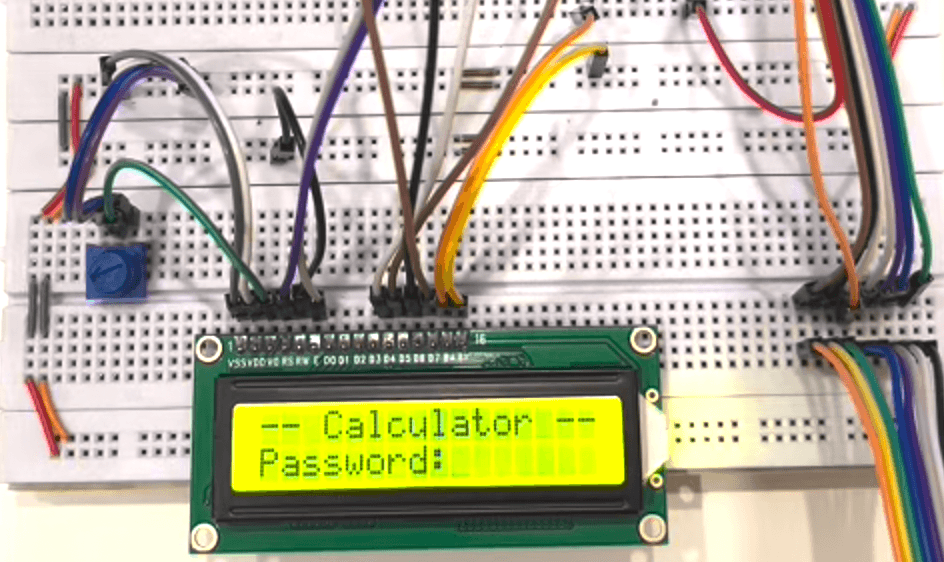
The system receives user input through a matrix keypad, processes numbers and arithmetic operators using the microcontroller, and displays the entered expression and calculated result through an LCD or character display module.
The project integrated GPIO configuration, matrix keypad scanning, display control, button debouncing, data processing, and embedded C programming.
02 · Project Objectives
The primary objectives were to:
Enter numbers and operators using a matrix keypad
Display user input in real time
Perform basic arithmetic operations
Present the calculated result
Support clear and reset operations
Detect and process invalid inputs
Create a complete embedded human-machine interaction workflow
03 · Hardware Components
The system mainly consisted of:
TM4C123GH6PM microcontroller
Tiva C Series TM4C123G LaunchPad
Matrix keypad
LCD or character display module
Breadboard
Connecting wires
Power and debugging interfaces
The matrix keypad was used to enter numbers, operators, and control commands. The display module presented the current input, operating status, and calculated result.
04 · Core Functions
Numerical Input
The user enters numbers through the matrix keypad. The microcontroller continuously scans the row and column states, identifies the pressed key, and combines individual digits into complete numerical values.
Operator Selection
The calculator supports the following arithmetic operations:
Addition
Subtraction
Multiplication
Division
After the user selects an operator, the system stores the first operand and waits for the second operand.
Result Calculation
When the equals key is pressed, the system performs the selected arithmetic operation and sends the result to the display module.
The software manages the operands, operator, and calculation state to prevent conflicts between inputs at different stages.
Clear Function
The clear key resets the current input, operands, operator, and result. The calculator then returns to its initial state and becomes ready for a new calculation.
Error Handling
The system detects invalid inputs and exceptional conditions, including:
Incomplete expressions
Multiple consecutive operators
Division by zero
Values exceeding the supported data range
Additional input while the system is in an error state
When an error is detected, the calculator displays an error message or resets the current operation.
05 · Matrix Keypad Scanning
The matrix keypad is connected to the GPIO pins of the microcontroller through row and column lines.
The software activates each row sequentially and reads the voltage levels of the column pins to identify the pressed key. The corresponding row-column combination is then converted into a number, operator, or control command.
The keypad-scanning process includes:
Initializing the row and column GPIO pins
Activating each row sequentially
Reading the state of each column
Identifying the pressed key
Converting its position into the corresponding character
Processing the number or control command
Waiting for the key to be released before continuing
Button-debouncing logic was added to prevent a single press from being registered multiple times.
06 · Display Control
The display module provides real-time feedback to the user by presenting:
Entered numbers
Selected arithmetic operators
Complete expressions
Calculated results
Clear or error states
The program sends characters to the display through the appropriate data and control interfaces, allowing the user to understand the current calculator state.
07 · Software Design
The system was developed using a modular software structure. Its primary modules included:
GPIO initialization
Matrix keypad scanning
Button debouncing
Numerical input processing
Operator processing
Arithmetic calculation
Display control
Error-state handling
System reset
The main program continuously scans the keypad and determines how each key should be processed according to the current system state.
For example, a numerical key may be used to enter either the first or second operand, while the equals key triggers calculation and result display.
08 · System State Management
The calculation process was divided into several operating states:
Waiting for the first operand
Receiving the first operand
Waiting for an operator
Receiving the second operand
Performing the calculation
Displaying the result
Clearing the system or starting a new calculation
This state-based approach enables the system to process numbers, operators, and control keys in the correct sequence while reducing input conflicts.
09 · Development and Testing
The project was developed through modular implementation and incremental integration.
The development process included:
Configuring the TM4C123GH6PM GPIO pins
Testing individual keypad inputs
Implementing the matrix keypad scanning algorithm
Testing character output on the display
Implementing multi-digit number entry
Developing the arithmetic operations
Adding clear and error-handling functions
Integrating the keypad, calculation logic, and display
Testing the complete user interaction process
Testing covered different numerical lengths, four arithmetic operations, repeated calculations, clear operations, division-by-zero errors, and invalid key combinations.
10 · Project Challenges
Keypad Input Recognition
The matrix keypad determines key positions through row and column scanning. Incorrect scan timing or GPIO configuration can cause missing, incorrect, or repeated inputs.
Button Debouncing
Mechanical keys may produce short voltage fluctuations when pressed or released. Without debouncing, the system may interpret one press as multiple inputs. Delay and key-release detection were used to reduce this problem.
Multi-Digit Number Processing
Because the keypad provides one digit at a time, the software must combine consecutive inputs into complete values while distinguishing between the first and second operands.
Calculation State Control
The system must determine whether it is receiving a number, waiting for an operator, or displaying a result. Clear state management is essential for maintaining the correct calculation sequence.
Invalid Input Handling
Conditions such as division by zero, incomplete expressions, and consecutive operators require separate handling to prevent incorrect results or unstable system behavior.
11 · Project Outcome
The final system implemented a complete calculation process from keypad input to result display. It supported numerical input, basic